

A phone that is warm after twenty minutes of gaming is normal. A phone that is hot in your pocket doing nothing is not, and it is telling you something specific. This guide starts with the quick fixes in order of likelihood, then works through the nine causes in detail for both iPhone and Android, so you can find the one that applies to you and stop guessing.
Start here and stop when the phone cools
If you only have two minutes, try these in order and stop when the phone cools:
- Unplug it, take the case off and put it on a hard, shaded surface. Nothing else matters until heat can escape.
- Turn on Airplane Mode for ten minutes. A weak signal makes the radios work flat out; this is the most overlooked cause.
- Close the navigation app, the camera or the game you were just using. These are the three heaviest workloads on any phone.
- Lower the brightness and, on Android, switch off the high refresh rate.
- Check Settings > Battery for an app burning power in the background and force-stop or uninstall it.
- Install pending OS and app updates.
- Check battery health. A worn cell runs hotter under the same load.
- Run a malware scan (Android) or review recently installed apps.
- Reset settings, then factory reset as a last resort.
If the phone is hot enough that you cannot comfortably hold it, is swelling, or keeps shutting down after cooling, skip to the repair section at the end.
First: is this normal warm, or dangerous hot?
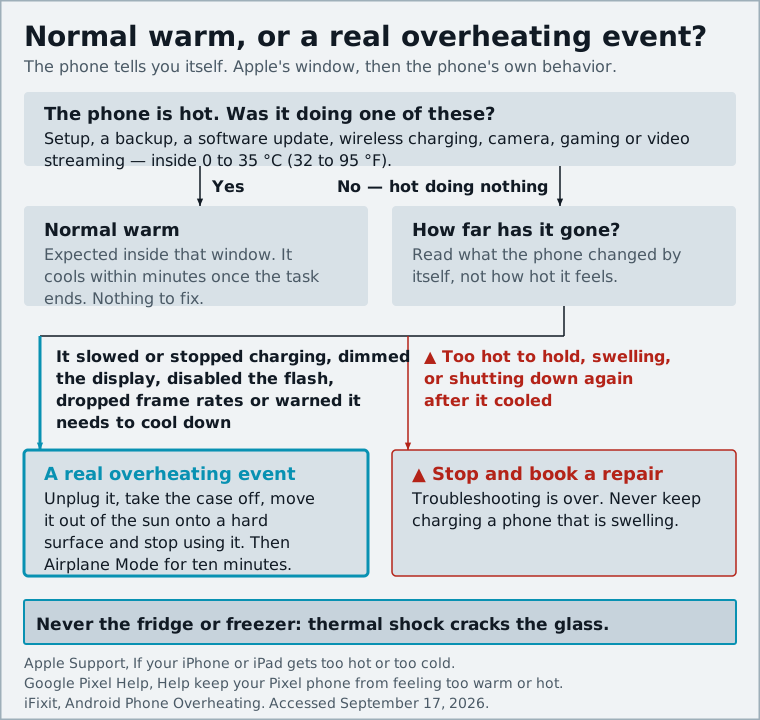
Apple says the iPhone is meant to be used between 0 and 35 degrees Celsius (32 to 95 Fahrenheit), and Android makers quote the same window. Inside it, a phone will get noticeably warm during setup, backups, software updates, wireless charging, camera use, gaming and video streaming. That is expected.
The phone tells you when things go further. An iPhone past its limits slows or stops charging, dims the display, disables the flash, drops frame rates and eventually shows the "Temperature: iPhone needs to cool down" warning. A Pixel will reduce CPU performance, slow charging, turn off the camera, throttle 5G and Wi-Fi and finally shut down to protect itself. Any of those behaviors means a real overheating event, not just a warm phone.
Cool it down right now (and what never to do)
The safe procedure is the same on every platform: unplug the charger, remove the case, move the phone out of direct sun onto a hard surface in a cool spot, and stop using it until it feels normal. If it shut itself down, let it cool completely before restarting.
Do not put it in the fridge or freezer. iFixit's troubleshooting guide warns that thermal shock can crack the front or rear glass, and Avast adds that the sudden change can cause condensation that permanently damages the phone. A fan or an air-conditioned room is fine; ice and cold water are not.
Fix 1: Close heavy apps and stop background refresh
If the phone got hot during a game, a 4K recording or a video call, that app was the heater; close it and the phone cools within minutes. The less obvious version is an app you are not looking at: a social app refreshing constantly, a photo library uploading over cellular, a widget polling location.
iPhone: Settings > Battery shows which apps consumed the most power and how much of that was background activity. For offenders, go to Settings > General > Background App Refresh and switch them off individually. Also open Settings > Privacy & Security > Location Services and change "Always" to "While Using" where you can.
Android: Settings > Battery > Battery usage lists the same thing. Tap an app and set its background usage to Restricted. Samsung adds a "Put unused apps to sleep" toggle under Device Care > Battery that Samsung itself recommends for heat problems.
Swiping apps out of the recents view does not help much and can cost more power when they cold-start. Fix the permission, not the app switcher.
Fix 2: Weak signal is a silent heater, try Airplane Mode
This is the one most people miss. When reception is poor, the modem raises its transmit power and keeps hunting for a better cell or access point. That work never shows up as an app in the battery list, but it produces steady heat, which is why a phone in a basement office, on a train or in a rural area can get warm in your pocket doing nothing. Samsung explicitly lists areas with poor or no signal as a cause of heat.
The test is simple: turn on Airplane Mode for ten minutes. If the phone cools, the radio was the problem. Longer term, prefer Wi-Fi over mobile data as Google advises, turn on Wi-Fi Calling indoors, use Airplane Mode with Wi-Fi re-enabled in a known dead zone, and if 5G coverage is patchy where you live, set the network mode to 4G/LTE only so the modem stops bouncing between networks.
Fix 3: Navigation, camera and games, manage the big three
These three workloads combine the processor, the display at full brightness, and often GPS and cellular data at once. Apple specifically calls out GPS turn-by-turn navigation and video recording in hot conditions, and AVG notes that navigation apps continuously use GPS and a data connection, which is why long drives with the phone on a sunny dashboard are the classic overheating scenario.
- Navigation: Mount the phone in an air vent rather than on the dashboard, download offline maps so the modem is not streaming tiles, and lower the brightness. If the temperature warning appears, the iPhone keeps giving audio directions with the screen off.
- Camera: Record at 1080p instead of 4K when you do not need the resolution, and give the phone breaks between long clips.
- Games: Cap the frame rate in the game's settings, and never game while fast charging; a hot processor plus charging current is the worst case for the battery.
Fix 4: Take the case off and charge on a hard surface
Charging generates heat as a byproduct, and wireless charging generates more of it, which is why both Apple and iFixit single it out. The phone's only cooling is passive conduction through its body, so anything that wraps it makes things worse.
- Charge on a desk or nightstand, never on a bed, sofa or under a pillow; a blanket traps heat and is a fire risk.
- Take the case off for fast or wireless charging if the phone feels hot, and prefer a cable overnight.
- Use a charger from the phone maker or a reputable brand. Samsung attributes heat to third-party or damaged chargers and debris in the port; AVG notes that a phone that overheats only while charging often has a worn cable, damaged port or failing battery.
Our guide to protecting phone battery health covers the charge-limit settings that keep the cell cooler over the long term.
Fix 5: Update your OS and apps
A poorly optimized app, or an OS bug that keeps a process spinning, makes the phone work harder than it needs to. Avast's advice is blunt: outdated apps cause performance issues, and updates patch them. Samsung's first recommendation for a warm Galaxy is likewise to check for software updates.
On iPhone, Settings > General > Software Update, then the App Store's account page for app updates. On Android, Settings > System > Software update (or Settings > Software update on Samsung), then Play Store > Manage apps and device. Expect the phone to run warm during installation and for a day or two afterward while it reindexes photos and files; give it 48 hours before you blame the update.
Fix 6: Check for malware and rogue apps
Persistent heat combined with a fast-draining battery, with no obvious app to blame, is a classic symptom of malicious software. AVG describes the Loapi trojan, a cryptominer that ran the processor so hard it made a test phone's battery bulge within two days. Avast likewise warns that malware can hijack the processor and memory, throttling performance and generating a lot of heat, and singles out cryptomining malware.
Android: Open Play Store > profile > Play Protect and run a scan, then check Settings > Apps for anything you do not recognize, especially apps installed from outside the Play Store. Boot into safe mode (long-press the on-screen power-off button); if the phone runs cool there, a third-party app is the culprit, so uninstall recent additions one at a time.
iPhone: True malware is rare on a non-jailbroken iPhone, but a rogue configuration profile can behave similarly. Check Settings > General > VPN & Device Management for profiles you did not install. For a broader checklist on spotting compromised devices, see our security section.
Fix 7: Turn down brightness and refresh rate
The display is the single largest power consumer in normal use, and its heat ends up in the same chassis as the processor. Google's guidance for a warm Pixel includes lowering display brightness; Avast notes that maxed brightness, live wallpapers and stacks of widgets all strain a phone's performance.
Enable auto-brightness rather than pinning it at maximum. On Android phones with 120 Hz screens, set the refresh rate to Standard or Adaptive (Motion smoothness on Samsung, Smooth display on Pixel); on iPhone, Low Power Mode caps ProMotion at 60 Hz if you need extra cooling. Drop live wallpapers and always-on display if the phone runs warm in standby.
Fix 8: Check battery health, an aging cell runs hotter
A worn lithium-ion battery has higher internal resistance, which means more of the energy it delivers turns into heat, and the phone may throttle or run hotter to compensate. iFixit lists a faulty battery as a primary suspect for a chronically hot phone.
iPhone: Settings > Battery > Battery Health. Apple designs the iPhone 15 and later to hold 80% capacity at 1,000 cycles and earlier models at 500; below 80% you will see a service recommendation.
Pixel: Settings > Battery > Battery health on Android 16, which flags capacity as "Reduced" below 80%. Samsung: the Samsung Members app under Diagnostics > Battery status, or a third-party monitor such as AccuBattery, which iFixit recommends for more detail.
Check physically as well. A swelling battery pushes the screen up along one edge or discolors it. If you see that, stop charging and have the battery replaced; it is not a software problem.
Fix 9: Reset settings or factory reset as a last resort
If nothing above helps and the phone is otherwise healthy, a stuck system process or corrupt setting may be responsible.
- Reset settings only. iPhone: Settings > General > Transfer or Reset iPhone > Reset > Reset All Settings. Android: Settings > System > Reset options, then reset app preferences and network settings. Your data stays.
- Back up, then factory reset. iCloud or Google One backup first, then Erase All Content and Settings (iPhone) or Erase all data (Android).
- Test before restoring. Use the phone for a day as a fresh device. If it stays cool, restore apps a few at a time; if the heat returns, you have found the app. If a fresh phone still overheats in standby, the problem is hardware.
When to stop troubleshooting and get it repaired
Stop and book a repair if the phone is too hot to hold or shuts down repeatedly when idle; if battery health is below 80% or the battery is swollen; if it overheats only while charging even with a known-good cable and charger, which points to the port or the battery; if it overheats in safe mode or after a factory reset; or if it has water damage in its history, since corrosion can create a partial short that shows up as heat.
A battery replacement solves most hardware-related overheating and costs a fraction of a new phone. From February 2027, EU rules will make that swap easier or the battery tougher; our piece on the EU replaceable battery rules explains what is coming.
Never chill a phone in the fridge, and never keep charging one that is swelling; those are the two ways a hot phone becomes a broken one.
Sources and further reading
- If your iPhone or iPad gets too hot or too cold - Apple Supportsupport.apple.com
- Help keep your Pixel phone from feeling too warm or hot - Google Pixel Helpsupport.google.com
- Why is my Galaxy phone hot and how to fix it - Samsung UK Supportsamsung.com
- Android Phone Overheating - iFixit Troubleshootingifixit.com
- Why Is My Phone Hot and How to Cool It Down? - Avastavast.com
- Why Your Phone Gets Hot and How to Fix It - AVGavg.com
- iPhone battery and performance - Apple Supportsupport.apple.com