

Walk past any laptop display in 2025 and you will see the same two things on the spec card: "NPU" and a number followed by "TOPS." Microsoft built an entire product category, the Copilot+ PC, around a single threshold of 40 TOPS, and Qualcomm, AMD and Intel have all redesigned their laptop chips to clear it. This explainer covers what a neural processing unit actually is, what it does that your CPU and GPU cannot, what the 40 TOPS rule means in practice, and whether you should pay extra for one.
Key takeaways
- An NPU is a processor block dedicated to the matrix math behind AI models. It is not faster than a GPU at that math; it is far more power-efficient.
- Microsoft's Copilot+ PC label requires an NPU rated at 40+ TOPS, 16GB of RAM and a 256GB SSD, on Windows 11 24H2 or later.
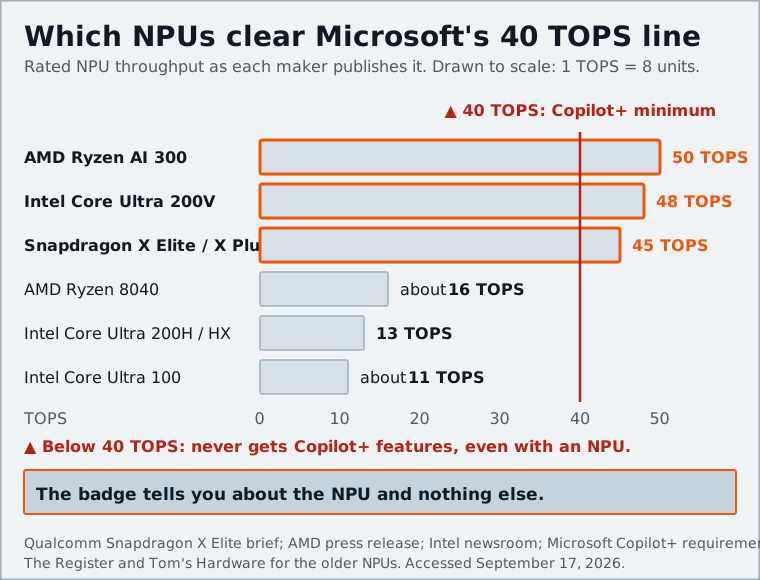
- Snapdragon X, AMD Ryzen AI 300 and Intel Core Ultra 200V chips all qualify; older chips with smaller NPUs do not, even if they have one.
- Windows decides which processor runs an AI task; you do not have to.
- For most people, the NPU is a nice-to-have that shows up as battery life, not a reason to replace a working laptop.
CPU, GPU, NPU: three kinds of processor in one chip
A modern laptop chip is not one processor but several, sharing a package and memory. Each is built for a different shape of work.
The CPU has a handful of large, complex cores. Each one is very good at running one thread of arbitrary logic quickly: branching, waiting on memory, jumping between tasks. It is the generalist.
The GPU has hundreds or thousands of small, simple cores that all do the same operation on different data at once. That is what drawing pixels requires, and it happens to be what AI math requires too, which is why data centers are full of GPUs.
The NPU takes the GPU's idea one step further. It is built almost entirely from multiply-accumulate units arranged to push matrices through as fast as memory allows, with little of the general-purpose machinery a GPU keeps for graphics. Microsoft's developer documentation describes an NPU as one that "is able to process large amounts of data in parallel" while "using energy on AI tasks more efficiently than a CPU or GPU," which shows up as longer battery life.
The important thing to understand is that the NPU is not the fastest AI processor in your laptop. A discrete GPU, or even a strong integrated one, will often run a given model faster. The NPU's job is to run it continuously, for hours, on a few watts, without the fan spinning up.
What an NPU is good at (and what it is not)
NPUs shine on workloads that are always on, predictable and modest in size:
- Camera and microphone effects. Background blur, eye contact correction, automatic framing and noise suppression in Windows Studio Effects run on the NPU during every video call, all day, without stealing CPU time from the call itself.
- Live transcription and translation. Live Captions turns audio from more than 40 languages into English subtitles in real time, offline, according to Microsoft's Copilot+ launch post.
- On-device image generation and editing. Cocreator in Paint and the "relight" and generative tools in Photos run small diffusion models locally.
- Indexing and search. Recall's screenshot analysis and the natural-language search across files, settings and photos that Microsoft describes in its NPU feature overview are NPU jobs, because they run in the background constantly.
What an NPU is not good at:
- Big models. A 40-50 TOPS NPU on shared system memory will not run a large language model at a speed you would enjoy; that still belongs to a GPU or the cloud.
- General computing. It cannot speed up Excel, a compiler or a game.
- Anything not written for it. An app that uses the GPU for AI features will keep using the GPU.
There is also a precision catch. Most AI models are trained in 32-bit floating point, but Microsoft notes that many NPUs only support lower-precision integer math such as INT8. Models have to be "quantized," converted to that smaller format, before they can run on the NPU at all. That conversion is where the impressive TOPS figures come from, and it is also why NPU and GPU numbers are not directly comparable.
TOPS explained: why 40 is Microsoft's magic number
TOPS stands for trillion operations per second: how many multiply-accumulate operations the hardware can theoretically complete each second at its peak, usually quoted at INT8 precision. It is a ceiling, not a measurement of any real task.
Three things make TOPS a rough guide rather than a benchmark:
- Precision matters. A chip quoted at INT8 will show roughly double the TOPS of the same chip quoted at FP16. Vendors pick the flattering number.
- Memory bandwidth is usually the real limit. An NPU that can do 45 TOPS but has to wait on system RAM will spend most of its time waiting.
- Software support decides whether the number is reachable. Without a driver and an execution provider for a given model, the NPU does nothing.
So why 40? When Microsoft introduced Copilot+ PCs on May 20, 2024, it picked a threshold high enough that the launch features, particularly Recall's constant screenshot analysis and real-time translation, could run entirely on-device without noticeable battery impact. It also happened to be a line that only Qualcomm's brand-new Snapdragon X Elite cleared at the time; Intel's Meteor Lake NPU managed around 11 TOPS and AMD's Ryzen 8040 about 16. The number was as much a statement about a new hardware generation as an engineering requirement.
What a Copilot+ PC actually requires
Microsoft's hardware requirements page and its Copilot+ vs Windows PC comparison set the bar as follows:
Scroll sideways to see the full table →
| Requirement | Minimum |
|---|---|
| NPU | 40+ TOPS |
| Memory | 16GB |
| Storage | 256GB SSD |
| Operating system | Windows 11 version 24H2 or newer |
| Processor | A qualifying SoC (see below) |
Meeting the bar unlocks a specific list of features that ordinary Windows 11 PCs do not get: Recall, Click to Do, Cocreator, Live Captions with translation, Windows Studio Effects, the AI photo tools and a natural-language search that works across local files. As Microsoft puts it, all Copilot+ PCs are Windows 11 PCs, but not all Windows 11 PCs are Copilot+ PCs.
Note what is not on the list: screen, weight, battery size or price. The badge tells you about the NPU and nothing else, so use it as a filter, not a recommendation.
Which chips qualify: Snapdragon X, Ryzen AI 300, Core Ultra 200V
Copilot+ launched as a Qualcomm exclusive. The first wave in June 2024 was all Snapdragon X Elite and X Plus, Arm-based chips with a 45 TOPS Hexagon NPU. On September 3, 2024, Microsoft extended the program to x86 with AMD's Ryzen AI 300 series and Intel's Core Ultra 200V series (Lunar Lake).
The rest of the difference is architecture: Snapdragon X is Arm, so x86 apps run through Prism emulation, the Ryzen AI 300 runs every Windows app natively and pairs its NPU with strong integrated graphics, and the Core Ultra 200V puts the emphasis on battery life, with its memory soldered on package.
Anything older is out, even with an NPU. Intel's Core Ultra 100 series (Meteor Lake) and AMD's Ryzen 8040 both have NPUs, but at 10-16 TOPS they fall short and will never get Copilot+ features. Newer generations of all three Windows families are expected to keep qualifying with larger NPUs; our thin-and-light laptop comparison covers the current chips.
If you are weighing Arm against x86 within the Copilot+ list, the NPU is the wrong thing to focus on; they are all above the line. The real question is app compatibility, which we cover in our Windows on Arm guide.
How Windows decides what runs on the NPU
You do not assign work to the NPU. Windows and the application do. Microsoft's documentation says Windows 11 "assigns processing tasks to the most appropriate place," and the mechanism behind that is Windows ML, Microsoft's on-device inference runtime built on ONNX Runtime.
The flow when an app runs an AI model on a Copilot+ PC, per the developer guide:
- Windows ML checks which accelerators the machine has.
- It picks the best execution provider for that hardware: Qualcomm's QNN provider for Snapdragon NPUs, Intel's OpenVINO provider for Intel NPUs, and so on. Microsoft is moving to deliver these through Windows Update rather than having each app bundle them.
- It loads the provider and runs the model.
- If the NPU is missing, busy or unsupported for that model, it falls back to the GPU, then the CPU.
That last step is why a Copilot+ PC and a regular PC can run the same AI app; the difference is where the work lands and how much power it costs. You can watch it happen: Task Manager on an NPU-equipped machine shows NPU utilization next to CPU, GPU and memory. Open it during a Teams call with background blur on and you will see the NPU working while the CPU stays nearly idle.
Do you need an NPU today? An honest answer
For most people, no, not yet, and probably not as a reason to buy.
The honest case for an NPU in 2025 is battery life during video calls and the handful of on-device features Microsoft has shipped. If you spend hours a day in Teams or Zoom with effects on, the difference is real and measurable. Live Captions with offline translation is useful if you need it. Recall is powerful but polarizing, and off by default.
The case against paying extra is stronger than the marketing suggests:
- The heavy AI you actually use, ChatGPT, Copilot, Gemini and image generators, runs in the cloud regardless of what chip is in your laptop.
- Local models that are worth running are memory-bound, and 16GB of shared RAM with a 40-50 TOPS NPU is not the machine for them. A GPU is.
- The features are Windows features. Third-party software targeting the NPU is still thin.
Where it becomes a non-issue: most thin-and-light laptop chips launched since late 2024 clear 40 TOPS anyway. The main exception is Intel's Core Ultra 200H and HX gaming and workstation chips, whose 13 TOPS NPU misses the bar. If you are buying a new thin laptop, you will most likely get a qualifying NPU whether you asked for one or not. Treat it as a bonus that makes your battery last longer, and make the decision on the things that still differ: screen, keyboard, weight, ports and whether your software runs on the architecture you are choosing.
Sources and further reading
- Copilot+ PCs developer guide (Microsoft Learn)learn.microsoft.com
- Copilot+ PC hardware requirements (Microsoft Support)support.microsoft.com
- Copilot+ PCs and Windows PCs: what are the differences? (Microsoft)microsoft.com
- Introducing Copilot+ PCs (Official Microsoft Blog)blogs.microsoft.com
- How the NPU is paving the way toward a more intelligent Windows (Microsoft Source)news.microsoft.com
- Copilot+ PCs expand availability with new AMD and Intel silicon (Windows Experience Blog)blogs.windows.com
- All about neural processing units (Microsoft Support)support.microsoft.com
- Snapdragon X Elite product brief (Qualcomm)qualcomm.com
- AMD Unveils Next-Gen Zen 5 Ryzen Processors to Power Advanced AI Experiences (AMD)ir.amd.com
- Intel Core Ultra 200V series mobile processors (Intel Newsroom)intel.com
- Intel says Lunar Lake's NPU is 4x faster than Meteor Lake's (The Register)theregister.com