

macOS Tahoe 26 is the most visible change to the Mac in more than a decade and, at the same time, the last macOS the four remaining Intel Macs will ever get. This review is desk research over Apple's release notes, its compatibility list and the reviews cited below: what Liquid Glass changes, whether the new Spotlight is finally a launcher worth using, what the Phone app and Live Activities add, and who should install it now.
Verdict: macOS Tahoe is a confident, mostly polished release that changes how the Mac looks far more than how it works. Spotlight is the standout, the Phone app and Live Activities are genuinely useful if you own an iPhone, and Liquid Glass is less disruptive on a Mac than on a phone. Apple silicon owners should upgrade once their critical apps are confirmed compatible. Intel owners get a stripped-down version and should think about what comes after.
What's new in macOS Tahoe 26 at a glance
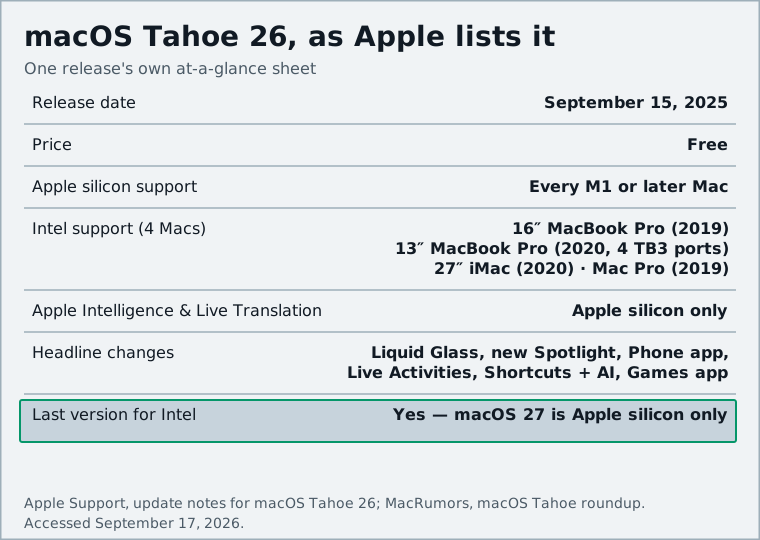
Apple announced Tahoe at WWDC on June 9, 2025 and shipped it on September 15, 2025, the same day as iOS 26. The version number jumped from 15 to 26 to match the year.
Pros
- Spotlight now launches apps, runs actions and keeps clipboard history, replacing a third-party launcher for many people
- Phone app, Call Screening and Hold Assist arrive on the Mac via your iPhone
- Live Activities from your iPhone appear in the menu bar
- Liquid Glass can be tuned down, and the redesign rarely gets in the way of work
- Shortcuts gains scheduled triggers and Apple Intelligence actions
Cons
- Intel Macs get no Apple Intelligence, no Live Translation and no future upgrades
- Some Liquid Glass elements reduce contrast until you adjust the settings
- Several headline features depend on owning an iPhone
- Expect early point releases to iron out bugs, as usual
Liquid Glass: less of a deal on the Mac than elsewhere
Liquid Glass is the translucent material Apple rolled out across every platform this year. Sidebars, toolbars, the Dock and menus reflect the color behind them and shift as you move windows. The menu bar is fully transparent by default, and app icons have been redrawn with a layered look that can be set to light, dark, tinted or clear.
MacStories' John Voorhees wrote on release day that Liquid Glass "is just not as big of a deal on the Mac as it is elsewhere" and that the visual changes had not affected his daily workflow. On a large display with a few windows open, most of what you look at is your content, and content is unchanged.
Where the design does intrude is contrast. Translucent toolbars over busy wallpapers can make small controls harder to read. Apple anticipated this: MacRumors' roundup notes there is an option to turn off the transparent menu bar, and you can pick a tinted or clear icon style rather than the default.
Update (November 2025): Apple went further in the 26.1 update, which added a dedicated Liquid Glass setting with a choice between the default clear look and a new tinted look, according to the release notes. If you found the initial build too glassy, that setting alone fixes most complaints.
The personalization side is small but welcome: folder colors and emoji folder icons in Finder, accent colors that flow through the interface, and icon tints that match your wallpaper.
Spotlight finally becomes a launcher worth using
This is the change most likely to alter how you use the Mac. For years, launching apps and running quick commands well meant a third-party tool. Tahoe's Spotlight closes much of that gap.
Three additions matter. First, actions: Spotlight can now send an email, create a note or calendar event, start a podcast or run a Shortcut without opening the relevant app, and third-party apps can expose their own actions through App Intents (MacRumors). Second, Quick Keys: you assign short strings of characters to actions, so typing two or three letters into Spotlight fires an action immediately. Third, clipboard history: Spotlight keeps track of what you have copied and lets you search and paste from that list, which is a feature Mac users have been installing utilities for since the early 2000s.
Results are also ranked better. GSMArena's launch report called it one of Spotlight's biggest updates ever. It is not as extensible as the best third-party launchers, but for most people it is now enough.
Phone app, Live Activities and iPhone continuity
Tahoe brings the iPhone's Phone app to the Mac. Calls route through Wi-Fi and a nearby iPhone, and the app carries over Recents, Contacts, Voicemail and the two features new in iOS 26: Call Screening, which asks unknown callers for their name and reason before your phone rings, and Hold Assist, which waits on hold for you and pings you when a live person picks up (MacRumors). Taking a call from a Mac is not new, but a real Phone app with voicemail in the Dock is a clear upgrade over the old FaceTime hand-off.
Live Activities fold the iPhone into the menu bar. Anything showing a Live Activity on your iPhone, a food delivery, a flight, a sports score, now appears in the Mac's menu bar; click it and iPhone Mirroring opens the relevant app. Both features need an iPhone signed in to the same Apple Account, so without one these parts of the update are empty.
Shortcuts, Apple Intelligence and Live Translation
Shortcuts gets two upgrades. Automations can now run on a schedule or in response to events such as receiving an email or saving a file, which brings the Mac closer to the iPhone's automation options. And Shortcuts gains "intelligent actions": Writing Tools and Image Playground as steps, plus a "Use Model" action that lets a Shortcut hand a task to the on-device model, Apple's Private Cloud Compute model or ChatGPT (MacRumors). The on-device option is the interesting one for privacy-minded users because nothing leaves the Mac.
Live Translation arrives in Messages, FaceTime and the Phone app, translating text and speech in real time: live captions in FaceTime, spoken translation on calls. It works well for the languages supported at launch, but it depends on Apple Intelligence, which leads to the least comfortable part of this review.
Beyond these, Tahoe adds a Games app with a friends list and leaderboards, Journal comes to the Mac, and Safari's Add to Dock web apps from Sonoma keep working; our PWA explainer covers what those installed sites can do.
Performance and stability on Apple silicon vs Intel
On Apple silicon the upgrade is uneventful, apart from Spotlight re-indexing after installation. The usual caveat applies: a first point release always follows within weeks, and some M3 Ultra Mac Studio owners have reported the installer refusing to upgrade at all. If you rely on audio plug-ins, virtualization or specialized drivers, check the vendor's compatibility statement first.
Update (September 29, 2025): Apple has released 26.0.1, which delivers bug fixes and resolves the issue that prevented some Mac Studio (M3 Ultra) owners from upgrading, per Apple's release notes.
On the Intel side, the story is about what is missing rather than what is slow. The four supported Intel Macs get the redesign, the new Spotlight, the Phone app and Live Activities. They do not get anything under the Apple Intelligence banner: no Writing Tools, no Genmoji, no Live Translation, no model actions in Shortcuts, because Apple limits all of that to Apple silicon (Macworld). Liquid Glass runs on the 2020 13-inch MacBook Pro, though its animations are less fluid than on M-series hardware.
The end of the road for Intel Macs
Apple said it plainly at WWDC: Tahoe is the last version of macOS that will run on Intel Macs. Only four Intel models are supported at all: the 2019 16-inch MacBook Pro, the 2020 13-inch MacBook Pro with four Thunderbolt 3 ports, the 2020 27-inch iMac and the 2019 Mac Pro (GSMArena). Everything older stopped at Sequoia or earlier.
Update (August 2026): Apple confirmed the timeline at WWDC 2026, where it announced macOS 27 Golden Gate. According to Macworld's macOS 27 guide, Golden Gate runs only on Apple silicon Macs from 2020 onward, including the new MacBook Neo, and is expected in mid-September 2026. Tahoe itself has kept moving in the meantime: 26.2 added the Edge Light video effect, 26.4 brought Safari's compact tab bar and Freeform design tools, and the current release as of this update is 26.6.2, per Apple's update notes.
For Intel owners, that means Tahoe should keep receiving security updates for a while after macOS 27 ships, as Apple has historically done for the previous two releases, but no new features. If your Mac is one of the four, Tahoe is still worth installing for Spotlight alone. If you are thinking about a replacement, our hardware section tracks the current Mac lineup.
Verdict: should you upgrade?
Who should upgrade now
- Anyone on an M1 or later Mac whose essential apps have confirmed Tahoe support. Spotlight, the Phone app and Live Activities are worth the change.
- iPhone owners, who get the most from the continuity features.
- Anyone bothered by the Liquid Glass look who is willing to turn off the transparent menu bar and switch to tinted icons (and see the November 2025 update above for the dedicated setting).
Who should wait or skip
- Professionals with specialized software (audio, video, CAD, virtualization) who have not yet seen a compatibility statement.
- Intel Mac owners who care about Apple Intelligence: none of it is coming to your machine, on this or any future version.
- Anyone who strongly prefers the flat, opaque look of Sequoia. You can tone Liquid Glass down, but you cannot turn it off entirely.
If you are weighing the Mac against a Windows PC, see what to expect from Windows 11 26H2.
Sources and further reading
- macOS 26 Tahoe: The MacStories Review (MacStories)macstories.net
- Everything new in macOS 26 Tahoe (Macworld)macworld.com
- macOS Tahoe: Everything We Know (MacRumors)macrumors.com
- Apple Unveils macOS Tahoe With Liquid Glass Design, Phone App, Live Translation, and More (MacRumors)macrumors.com
- What's new in the updates for macOS Tahoe 26 (Apple Support)support.apple.com
- macOS Tahoe 26 brings overhauled Spotlight, Shortcuts and Live Activities (GSMArena)m.gsmarena.com
- macOS 27 Golden Gate guide (Macworld)macworld.com
- Use Safari web apps on Mac (Apple Support)support.apple.com