

Two years ago the best-known prompting trick was to add "let's think step by step." On the models you are using in 2026, that line is at best redundant and at worst a step backward, because the model already thinks before it answers, in tokens you never see. This tutorial shows you what to write instead: how to state a goal so the model's built-in reasoning has something to aim at, how to use the effort or thinking controls that replaced "think harder," and how to structure a prompt so that long material and instructions do not fight each other. It ends with three templates you can copy.
What you need: one current reasoning model and its effort control
You need access to at least one current reasoning model. The techniques here are the same across vendors, with small differences in the names of the controls:
- OpenAI GPT-5.5 (released April 23, 2026). Reasoning is on by default and controlled by a
reasoning.effortsetting; in ChatGPT it is the model picker and "thinking" options. - Claude Opus 4.6 and later, Claude Sonnet 4.6 and later. Reasoning is controlled by an
effortparameter in the API and by the effort or thinking toggle in the Claude apps. - Gemini 2.5 and Gemini 3 models. Reasoning is controlled by a
thinking_levelsetting in the API and by the model choice in the Gemini app.
If you only use the consumer apps, you will not see parameter names, but every setting below has an equivalent switch in the interface, and the prompt advice is identical.
What changed: the model already thinks
A reasoning model runs a hidden deliberation phase before producing its visible answer. That is the whole difference. Older chat models produced the answer directly, so asking them to "show their work" forced a reasoning trace into the output, which measurably improved accuracy. Reasoning models do that trace internally and at a length they choose, so the classic chain-of-thought instruction mostly adds noise.
The vendors now say this in their own documentation. Anthropic's prompting guide recommends general instructions such as "think thoroughly" over a hand-written step-by-step plan, on the grounds that the model's own reasoning often exceeds what a human would prescribe. OpenAI's reasoning guide says the same in different words: give the model the task, the constraints and the output format, and do not script every intermediate step.
The practical shift is from steering the model's thinking to defining the target. Your prompt is now a specification, not a walkthrough.
Step 1: State the goal, the constraints and the success criteria
Start every serious prompt with three things, in this order.
- The goal. One or two sentences on what you want and who it is for. "Write a 300-word summary of this report for a non-technical board" beats "summarize this."
- The constraints. Length, format, audience, what to exclude, what sources to rely on. Say why a constraint exists when it is not obvious; the Claude docs note that explaining the motivation behind an instruction helps the model apply it in cases you did not anticipate.
- The success criteria. How you will judge the result. "Done means every number in the summary appears in the source" gives the model something to verify against before it answers.
Current models follow instructions more literally than their predecessors. That is good news for precision and bad news for vague prompts: if you do not say you want a table, you may get prose, and if you say "brief," you get brief. Write down what you actually want.
Step 2: Pick the effort level instead of writing "think harder"
"Think harder about this" is a weak instruction because the model cannot tell how much harder. Every major vendor has replaced it with an explicit dial.
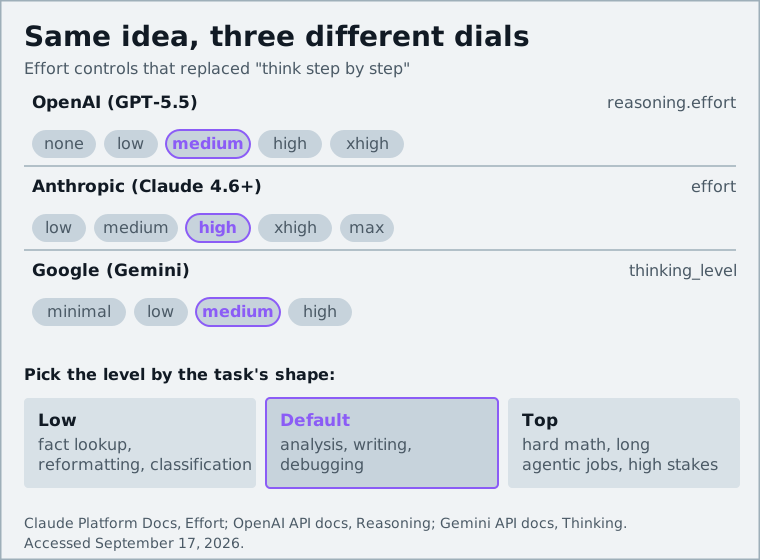
OpenAI's docs describe reasoning.effort as a tuning knob, not the primary way to recover quality, and list medium as the recommended starting point for GPT-5.5. Anthropic's effort documentation says the parameter shapes every output token, not only the thinking, so lower effort also produces terser answers and fewer tool calls. Google's thinking guide suggests minimal or low for retrieval and classification and the top level for advanced coding, math and multi-step planning.
The rule of thumb: pick the effort level by the shape of the task, then fix problems with the prompt. Fact lookup, reformatting and classification want low. Analysis, writing and debugging want the default. Hard math, long agentic jobs and anything where a wrong answer is expensive want the top setting, and you should expect to wait and pay for it. If a model at low effort gives a shallow answer to a hard question, raise the effort rather than adding "please be thorough."
Step 3: Put long material first, the question last
If your prompt contains a document, a transcript, a log or a codebase excerpt, put it at the top and your instructions and question at the bottom. Anthropic's long-context guidance is explicit that longform inputs should sit above the query, and reports that placing the query at the end improved response quality by up to 30 percent in its tests, especially with complex, multi-document inputs.
The reason is that the model's attention on the final instruction is strongest when that instruction is the last thing it reads. Buried in the middle of a 20-page paste, "answer in French" gets lost. At the end, it is unmissable.
With multiple documents, wrap each one in its own labeled block (see Step 4) and include a source name, so the model can cite which document a claim came from. Then ask it to quote the relevant passages before answering; this grounds the answer and makes verification easy.
Step 4: Use structure (headers, XML tags) rather than clever wording
Reasoning models are good at parsing structure and bad at guessing which of your sentences is an instruction, which is context and which is an example. Separate them physically. Anthropic recommends XML-style tags such as <instructions>, <context> and <input>; OpenAI's guidance favors clear delimiters and headers. Markdown headings work fine in the consumer apps.
A well-structured prompt looks like this:
<context>
You are helping a small nonprofit write its annual report.
</context>

<document>
[paste the draft report here]
</document>

<instructions>
Edit the draft for clarity and consistency. Keep the author's voice.
Do not change any figures. Flag any sentence that makes a claim without a number to support it.
</instructions>

<output_format>
Return the edited draft, then a bulleted list of flagged sentences.
</output_format>
Nothing in that prompt is clever. That is the point. The wording that used to matter ("You are a world-class editor with 20 years of experience...") matters far less than the model being able to tell, unambiguously, what is the document and what is the ask.
Step 5: Add one or two examples only when format matters
Few-shot examples were a core technique for older models. On reasoning models they are still the most reliable way to pin down a format, tone or structure, but they are unnecessary for the task itself; the model can work out how to summarize or classify without being shown.
So use examples when the shape of the output is unusual or strict: a specific JSON layout, a house style for headlines, a particular way of writing commit messages. Wrap them in an <example> block so they are not mistaken for instructions, keep them short, and make sure they are actually correct, because the model will copy errors as faithfully as it copies style. Skip examples when you just want a good answer; a stray example can anchor the model to the wrong length or register.
Step 6: Ask for verification, not confidence
A reasoning model asked "how confident are you?" will produce a number that sounds calibrated and often is not. Asking it to verify is more useful, because verification is a task and the model is good at tasks.
Concretely: "Before you answer, check each figure against the document and list any you could not find." Or for code: "After writing the function, walk through the three edge cases in the spec and state whether each passes." Or for research: "Separate what the sources state from what you are inferring."
OpenAI's guidance for complex workflows is to define what counts as done and how the model should verify its own work. This is also the most effective single defense against hallucination, which we cover in more depth in our guide to spotting and fixing AI hallucinations.
Anti-patterns: over-engineered prompts and buried instructions
The common mistakes of 2026 are the opposite of the ones from 2023. People are no longer under-prompting; they are over-prompting.
- The 600-word system prompt. Long prompts are not better prompts. Every extra rule is a chance for two rules to conflict, and a reasoning model will spend effort resolving the conflict. Cut anything the model would do by default.
- Manual chain-of-thought. "First, identify the key entities. Second, list their relationships. Third..." on a model that already reasons. If you want a specific reasoning style, show one example of it; do not script it.
- Instructions in the middle. The critical constraint should be first or last, never buried after the pasted document.
- Stacked personas. "You are a senior engineer who is also a security expert and a technical writer." Pick the one that changes the answer.
- Fighting the effort setting with words. "Take your time and think very carefully" does less than moving the dial one notch.
- Threats and bribes. They were never reliable and they are not now.
The Analytics Vidhya 2026 prompting guide summarizes the same principles: clear and concise, explicit output format, examples mainly for format, critical instructions at the edges, and no over-engineering.
Copy-paste templates for research, writing and debugging
Each template assumes you have set effort appropriately: default for the first two, the top level for the third if the bug is genuinely hard.
Research brief
<sources>
[paste 1–5 sources, each labeled with a name and URL]
</sources>

<task>
Answer the question below using only the sources above.
Quote the relevant passage from a source before each claim.
If the sources disagree, say so. If they do not cover something, say "not covered".
</task>

<question>
[your question]
</question>

<output_format>
1. Short answer (3 sentences max)
2. Evidence, one bullet per claim, each with a quoted passage and source name
3. Gaps and disagreements
</output_format>
Writing
<audience>
[who will read this and what they already know]
</audience>

<goal>
[what the piece should achieve, e.g. "get the reader to sign up for the pilot"]
</goal>

<constraints>
Length: [n] words. Tone: [plain, no hype]. Avoid: [jargon, passive voice, exclamation marks].
Facts: use only what is in <notes>; do not add statistics or quotes.
</constraints>

<notes>
[your bullet points]
</notes>

Draft the piece. Then list any claim in the draft that you could not trace to the notes.
Debugging
<code>
[the relevant function or file]
</code>

<error>
[exact error message and stack trace]
</error>

<expected>
[what should happen, including inputs]
</expected>

Find the root cause. Explain the mechanism in two sentences, propose the smallest fix,
and then state how you verified the fix against <expected>. If you need more context
to be sure, list exactly which files or values you need.
Paste, fill in the brackets, and adjust the effort dial rather than the wording when the result is not deep enough.
The next lever is tools, not longer prompts
Once these habits are in place, the next lever is tools: giving the model a way to search, run code or read your files changes what it can verify. Our explainer on AI agents and the Model Context Protocol covers how that works, and if you are deciding which paid assistant to prompt in the first place, see the comparison of ChatGPT Plus, Claude Pro and Google AI Pro.
Sources and further reading
- Prompting best practices (Claude Platform Docs)platform.claude.com
- Effort (Claude Platform Docs)platform.claude.com
- Prompt engineering best practices for 2026 (Claude by Anthropic)claude.com
- Reasoning models (OpenAI API docs)developers.openai.com
- Introducing GPT-5.5 (OpenAI)openai.com
- GPT-5.5 model page (OpenAI API docs)developers.openai.com
- Thinking (Gemini API docs)ai.google.dev
- Every AI Prompting Technique That Works on Reasoning Models (Karo Zieminski)karozieminski.substack.com
- Prompt Engineering Guide 2026 (Analytics Vidhya)analyticsvidhya.com