

"Turn on two-factor authentication" is the most repeated piece of security advice on the internet, and it is good advice. But it hides a big range. A six-digit text message, a code from an authenticator app, a hardware key you tap, and a passkey stored on your phone all count as "2FA," and they fail in very different ways. This guide explains what each method actually stops, where each one breaks, and which one to use on which account, so you can spend ten minutes on the settings that matter instead of feeling vaguely protected.
What each method stops, and where to use it
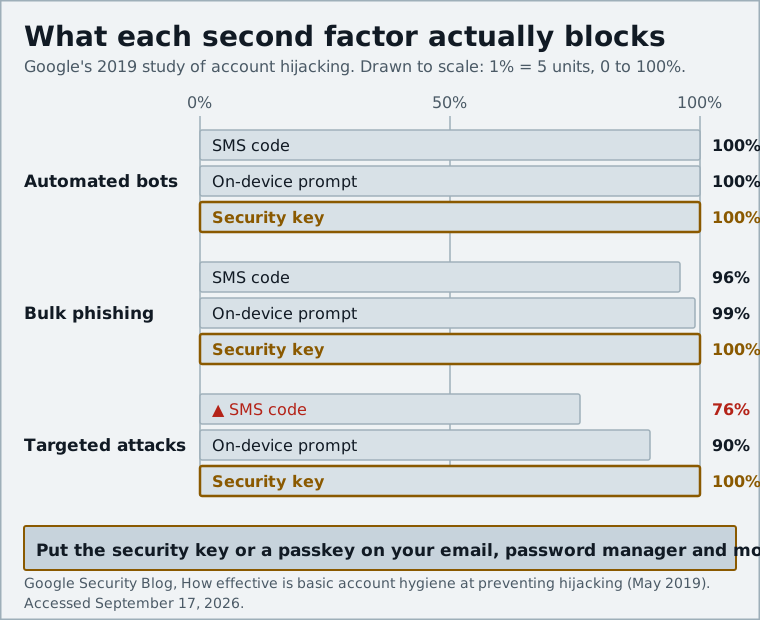
- Any second factor is a huge upgrade over a password alone: Google's research found that even an SMS code blocked 100% of automated bot attacks and 96% of bulk phishing.
- SMS codes can be hijacked through SIM swapping, and both SMS and authenticator-app codes can be relayed by a real-time phishing site.
- Hardware security keys and passkeys are the only common methods that are phishing-resistant, because they check the website's real domain before they respond.
- Use a phishing-resistant method on your email, password manager and financial accounts; an authenticator app is fine for most of the rest.
- Always set up a second method and store your backup codes, so losing a phone does not lock you out.
What two-factor authentication actually protects against
A password is a single secret. If it leaks in a breach, gets guessed, or you type it into a fake login page, whoever has it is you as far as the service is concerned. Two-factor authentication (2FA, also called two-step verification or multi-factor authentication) adds a second check that a stolen password alone cannot pass.
The second factor is usually something you have (a phone, a key) rather than something you know. The important question is not whether you have 2FA but what an attacker needs to defeat it. Broadly there are three attack types:
- Automated credential stuffing: bots trying leaked passwords on thousands of sites. Any second factor stops this cold.
- Bulk phishing: mass emails pointing to fake login pages. Simple factors stop most of this, but not the more sophisticated variants.
- Targeted attacks: someone specifically after your account, willing to call your carrier or build a convincing fake site. This is where the methods separate.
Google's 2019 study of account hijacking, summarized on its security blog, put numbers on this. An SMS code blocked 100% of automated bots, 96% of bulk phishing attacks and 76% of targeted attacks. On-device prompts did better: 100%, 99% and 90%. Security keys blocked all three categories in the study. The gap between "76%" and "100%" on targeted attacks is the whole story of this article.
SMS codes: better than nothing, but SIM swapping is the catch
SMS 2FA is the method everyone recognizes. You enter your password, the site texts you a code, you type it in. It requires no app and works on any phone, which is why banks and many services still default to it.
Its weakness is that your phone number is not really yours; it belongs to your carrier, and carriers can be talked into moving it. In a SIM swap, an attacker convinces the carrier (through social engineering, a bribed employee or a leaked account PIN) to transfer your number to a SIM they control. From that moment, your calls and texts, including every 2FA code, land on their phone.
This is not a hypothetical. The FBI's Internet Crime Complaint Center warned in 2022 that it had received 1,611 SIM-swap complaints in 2021 alone, with adjusted losses of more than $68 million. Its 2023 annual report still counted 1,075 complaints and about $48.8 million in reported losses, and those are only the cases people reported. Cryptocurrency holders are the favorite target, because a hijacked number plus a password reset can empty an exchange account in minutes.
SMS has a second problem: a fake login page can simply ask you for the code. You type it, the attacker's script forwards it to the real site within seconds, and they are in. That attack is described in the next section, because it applies to authenticator apps too.
Two mitigations help if SMS is your only option. Set a port-out or account PIN with your carrier, and never read a code to anyone who calls you, even if they claim to be from the company. A legitimate support agent has no reason to ask.
Authenticator apps (TOTP): free, offline, still phishable
Authenticator apps generate time-based one-time passwords (TOTP). When you set one up, the service shows a QR code containing a secret; the app stores it and uses the current time to compute a new six-digit code every 30 seconds. Nothing is sent over the network, so there is no SMS to intercept and no SIM to swap.
That makes TOTP a real step up from SMS. It is also free, works without cell signal, and is supported almost everywhere. Good open-source choices in 2025 include Aegis on Android, 2FAS on both platforms and Ente Auth, which syncs encrypted backups across devices. One caution: Raivo, long the go-to on iOS, changed owners, and PrivacyTools now suggests moving to a clearly maintained alternative. Whatever you pick, turn on its encrypted backup or export feature before you need it.
The limit of TOTP is that the app has no idea which website is asking for the code. If you land on a convincing fake of your bank's login page, the page asks for your password and then your six-digit code, exactly like the real site would. Behind the scenes a reverse-proxy toolkit such as Evilginx passes both to the genuine site in real time, well inside the 30-second window, and captures the session cookie the site hands back. Cisco Talos has documented this technique in detail, and Abnormal AI reports that Gmail, Outlook and Yahoo accounts are among the most common targets of Evilginx-based kits.
So TOTP protects you against leaked passwords and SIM swaps, but not against a well-built phishing page. Push notifications ("Is this you? Approve / Deny") have the same limitation, plus a new one: attackers can spam approval requests until a tired user taps Approve.
Hardware security keys: why phishing simply fails
A hardware security key is a small USB or NFC device (YubiKey, Google Titan, and various cheaper FIDO-certified keys). When you register it with a site, the key generates a key pair specifically for that site's domain. At login, the browser tells the key which domain is asking; the key only signs the challenge if the domain matches the one it was registered on.
This is what "phishing-resistant" means in practice. A fake site at accounts-google.example cannot get a valid signature, because the key was registered on google.com and it will not respond to anything else. There is no code to type, so there is nothing for you to be tricked into handing over. The standard behind this is FIDO2/WebAuthn, maintained by the FIDO Alliance and the W3C.
The strongest evidence that this works came from Google itself. After it required security keys for its more than 85,000 employees starting in early 2017, the company told Krebs on Security that it had seen no reported or confirmed account takeovers since. That is a company that is phished constantly, and the number went to zero.
The cost is modest. Yubico's YubiKey 5 NFC supports FIDO2, U2F, TOTP, PIV smart card and OpenPGP in one device and stores up to 100 passkeys; as of early 2025 the 5 Series sells for roughly $50 to $75 depending on connector, and plain FIDO2-only keys start well under that. The real cost is discipline: you need two keys (one registered as a backup and kept somewhere safe), and you need to remember to carry the primary.
Passkeys: the phishing-resistant option built into your phone
Passkeys use the same FIDO2/WebAuthn cryptography as a hardware key, but the private key lives in your phone's or computer's secure hardware instead of on a separate device, and you unlock it with your fingerprint, face or device PIN. Because the key is bound to the site's real domain, passkeys are phishing-resistant in the same way security keys are.
Two things make passkeys more practical for most people than a physical key. First, they are already there: iCloud Keychain, Google Password Manager, Windows Hello and most third-party password managers can create and store passkeys. Second, they sync. A passkey created on your phone appears on your laptop, and if you lose the phone, it is recoverable from your account. (Hardware-key passkeys do not sync, which is part of what makes them stronger, and part of what makes them less forgiving.)
Passkeys can also replace the password entirely rather than acting as a second factor. That is the direction Google, Apple and Microsoft are pushing, and we walk through the setup in how to set up passkeys on Google, Apple and Microsoft accounts. The gap today is coverage: many sites still do not support passkeys, and some that do only allow them alongside a password, which means the password still has to be protected with a second factor.
Which method for which account: a simple priority list
The methods stack up like this, from weakest to strongest:
Scroll sideways to see the full table →
| Method | Stops leaked passwords | Stops SIM swap | Stops real-time phishing | Cost | Works offline |
|---|---|---|---|---|---|
| SMS code | Yes | No | No | Free | No (needs signal) |
| Authenticator app (TOTP) | Yes | Yes | No | Free | Yes |
| Push notification | Yes | Yes | No | Free | Needs data |
| Passkey (synced) | Yes | Yes | Yes | Free | Yes |
| Hardware security key | Yes | Yes | Yes | About $25 to $75 | Yes |
You do not need the top of the ladder everywhere. Match the method to what the account can do to you:
- Your primary email account. This is the account that resets every other account. Use a passkey or a hardware key, and remove SMS as a fallback if the service allows it. If you think this account may already be compromised, follow our Google account recovery walkthrough first.
- Your password manager. Same reasoning. A hardware key is ideal here because it also protects you if your phone is stolen unlocked. Our Bitwarden, 1Password and Proton Pass comparison covers which managers support keys and passkeys on which tiers.
- Banking, brokerage and crypto exchanges. Use the strongest option the institution offers. Many banks still only offer SMS; in that case set a carrier PIN and keep a close eye on login alerts.
- Social media, shopping, cloud storage. An authenticator app is fine. Switch to a passkey when the service supports it, since it is more convenient anyway.
- Accounts that only offer SMS. Turn it on. It is still far better than a bare password, as the Google numbers show.
Finally, once you have set up a stronger method, go back and remove the weaker ones where possible. An account that accepts a passkey but still falls back to SMS is only as strong as the SMS.
Backup codes and a second method so you never lock yourself out
The most common real-world 2FA disaster is not a hacker. It is a lost, broken or wiped phone, and an authenticator app that was never backed up. Three habits prevent it:
- Save your backup codes. Almost every service generates a set of one-time recovery codes when you enable 2FA. Store them in your password manager or print them and keep them with your important documents. Do not leave them in a screenshot on the same phone.
- Register two methods. A passkey on your phone plus a hardware key in a drawer, or an authenticator app plus a security key. Losing one should be an inconvenience, not a lockout.
- Back up the authenticator itself. Aegis, 2FAS and Ente Auth all offer encrypted exports or sync. Test the restore once so you know it works.
One more habit: keep your recovery email and phone number current on every important account. Recovery options are how you get back in, and stale ones are useless exactly when you need them.
Any second factor beats none, so if an account still relies on a password alone, turn on whatever it offers today. But the methods are not interchangeable: SMS and authenticator codes can be phished in real time, while passkeys and hardware keys cannot. Put a phishing-resistant method on your email, your password manager and your money, keep an authenticator app for everything else, and store your backup codes somewhere you will actually find them.
Sources and further reading
- New research: How effective is basic account hygiene at preventing hijacking (Google Security Blog)security.googleblog.com
- Google: Security Keys Neutralized Employee Phishing (Krebs on Security)krebsonsecurity.com
- Criminals Increasing SIM Swap Schemes to Steal Millions of Dollars from US Public (FBI IC3)ic3.gov
- 2023 Internet Crime Report (FBI IC3)ic3.gov
- State-of-the-art phishing: MFA bypass (Cisco Talos)blog.talosintelligence.com
- Cybercriminals Use Evilginx to Bypass MFA (Abnormal AI)abnormal.ai
- YubiKey 5 NFC (Yubico)yubico.com
- Raivo OTP Review (PrivacyTools.io)privacytools.io